
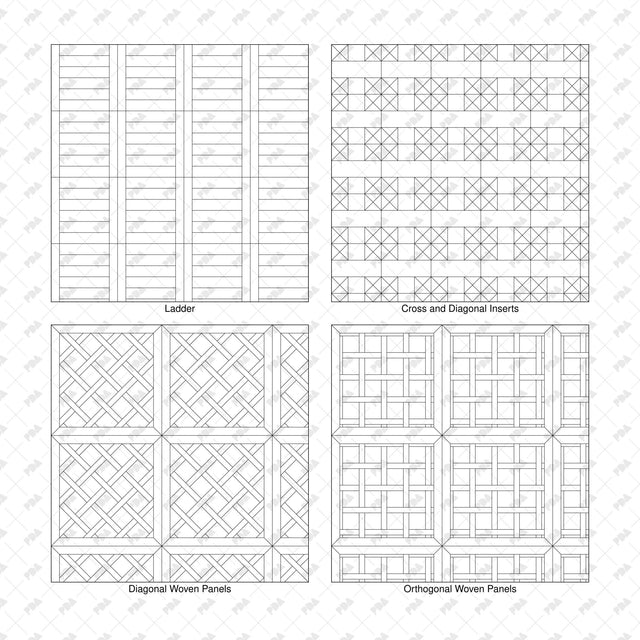


Illustrator Pattern Library - Parquet - 16 Vector Swatches
Description: Set of 16 seamless parquet and wood-flooring patterns supplied as an Adobe Illustrator AI swatch library and an editable SVG catalog. Includes straight planks, herringbone, chevron, woven arrangements and geometric panel designs in clean black vector line art.
Designed for architects, interior designers, students and architectural illustrators. Apply flooring patterns to plans, interior studies, material diagrams and presentation drawings.
Included Elements: Aligned Planks, Running Bond, Random Stagger, Herringbone, Double Herringbone, Chevron, Mosaic Squares, Pinwheel, Ladder, Cross and Diagonal Inserts, Diagonal Woven Panels, Orthogonal Woven Panels, Framed Herringbone, Diamond Panels, Octagon and Square, Rhombus Cube.
Use Cases: Architectural floor plans, interior layouts, flooring comparisons, renovation studies, material diagrams, architectural collages and presentation boards.
Why This Set:
- 16 distinct flooring layouts, from simple planks to decorative panels
- Seamless vector repeats with no raster textures
- One named AI swatch library for filling shapes in Illustrator
- Editable SVG catalog with separate sample fills, borders and captions
- Can be scaled for different drawing sizes
File Format: Adobe Illustrator AI pattern swatch library plus editable SVG catalog.
How to Install the Library:
- Extract the downloaded ZIP and keep Parquet_Patterns_16_Swatch_Library.ai in a permanent folder.
- In Adobe Illustrator, open Window > Swatches.
- Open the Swatches panel menu and choose Open Swatch Library > Other Library.
- Select Parquet_Patterns_16_Swatch_Library.ai and click Open.
- Select a shape, activate its Fill, then click a pattern in the library panel.
Free Products
Free products is all product that you download for FREE. Free products can be used in any type of use - both academic and commercial. When using a set, a pack or part of it, you are required to give full credit to Post Digital Architecture (with an active link for online versions).
When a product is used in a project that is published on social media, you are required to give full credit to Post Digital Architecture (with an active tag to @postdigitalarchitecture on Instagram or other social media's profile).
Student License (Academic, Educational Use)
When using a product tagged with “Student License” you are allowed to use it for academic purposes only. Giving a credit to Post Digital Architecture is much appreciated.
Commercial License
Once bought, you are free to use the product without giving attribution.
What is strictly not allowed to do (in all cases)?
Products can’t be sold without being part of a bigger artwork like a drawing, collage, rendering, poster or any other work combining Post Digital Architecture’s digital products with other graphic or digital elements.
Also, you are not allowed to use products from Post Digital Architecture in similar or any competing services.