
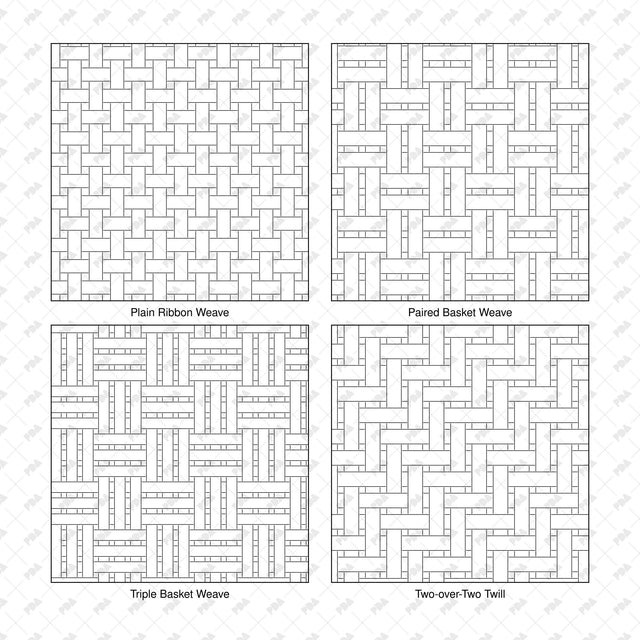


Illustrator Pattern Library - Rattan Cane and Wicker Weaves
Description: Set of 16 seamless rattan, cane and wicker weave patterns supplied as an Adobe Illustrator AI swatch library and an editable SVG catalog. Includes plain, basket, twill, herringbone, diamond and open cane arrangements in black vector linework, with visible over-and-under strand crossings.
Created for architects, interior designers, furniture designers and students preparing furniture elevations, interior drawings, material studies and presentation boards.
Included Elements: Plain Ribbon Weave, Paired Basket Weave, Triple Basket Weave, Two-over-Two Twill, Three-over-One Twill, Herringbone Weave, Diamond Twill Weave, Block Basket Weave, Open Square Cane, Paired Open Cane, Cross-Laced Cane Web, Double-Laced Cane Web, Alternating Reed Widths, Ribbed Wicker Weave, Broken Twill Weave, Stepped Diamond Weave.
Use Cases: Chair seats and backs, cabinet fronts, room dividers, woven wall panels, headboards, screens and hospitality interiors. Use these graphic material representations in elevations, details and architectural collages.
Why This Set:
- 16 distinct arrangements with seamless repeats on both axes
- Editable vector linework that scales without pixelation
- Ready-to-load Illustrator pattern swatches
File Format: Adobe Illustrator AI pattern swatch library and editable SVG pattern catalog.
How to Install the Library:
- Extract the ZIP and keep Rattan_Cane_and_Wicker_Weaves_16_Swatch_Library.ai in a permanent folder.
- In Adobe Illustrator, open Window > Swatches.
- Open the Swatches panel menu and choose Open Swatch Library > Other Library.
- Select Rattan_Cane_and_Wicker_Weaves_16_Swatch_Library.ai and click Open.
- Select a shape, activate its Fill and click a pattern in the library panel.
Free Products
Free products is all product that you download for FREE. Free products can be used in any type of use - both academic and commercial. When using a set, a pack or part of it, you are required to give full credit to Post Digital Architecture (with an active link for online versions).
When a product is used in a project that is published on social media, you are required to give full credit to Post Digital Architecture (with an active tag to @postdigitalarchitecture on Instagram or other social media's profile).
Student License (Academic, Educational Use)
When using a product tagged with “Student License” you are allowed to use it for academic purposes only. Giving a credit to Post Digital Architecture is much appreciated.
Commercial License
Once bought, you are free to use the product without giving attribution.
What is strictly not allowed to do (in all cases)?
Products can’t be sold without being part of a bigger artwork like a drawing, collage, rendering, poster or any other work combining Post Digital Architecture’s digital products with other graphic or digital elements.
Also, you are not allowed to use products from Post Digital Architecture in similar or any competing services.