Selected by Post Digital Architecture · November 2026
Fifty free Google Fonts for architecture portfolios, presentation boards and drawing labels. A short note on each, plus six pairs.
For a first portfolio: Inter for text, Space Grotesk for headings. Start there if you only need one pair.
Save for later On Windows, press Ctrl + D . On Mac, press ⌘ + D .
On a phone, open the browser menu or Share menu and choose Add Bookmark or Add to Bookmarks.
Visual pairings Everyday text Titles Longer reading Drawing labels Posters & sketches Questions Font index, A–Z Six pairings
Heading first. Text second.
Pair 1 Heading / text
Portfolio pages
Title: SemiBold · Text: Regular
Pair 2 Heading / text
Presentation boards
Title: SemiBold · Text: Regular
Pair 3 Heading / text
Research portfolios
Title: SemiBold · Text: Regular
Pair 4 Heading / text
Opening pages
Title: Regular · Text: Regular
Pair 5 Heading / text
Covers and posters
Title: Bold · Text: Regular
Pair 6 Heading / text
Theses and project books
Title: SemiBold · Text: Regular
All samples use Regular. Compare Aa, then check R, g, 0, O, 1, l and I.
1–10 / 50
Text & captions
For the text beside the work.
1
Inter
Regular
Inter Regular: Aa; R and g; zero and O; one, lowercase l and uppercase I; 0123456789
Portfolio text
A safe first choice. Regular for text, SemiBold for headings.
Google Fonts
2
Source Sans 3
Regular
Source Sans 3 Regular: Aa; R and g; zero and O; one, lowercase l and uppercase I; 0123456789
Small captions
Small captions are its strong point. Leave a little space between lines.
Google Fonts
3
IBM Plex Sans
Regular
IBM Plex Sans Regular: Aa; R and g; zero and O; one, lowercase l and uppercase I; 0123456789
Research reports
Pair with IBM Plex Serif when the text runs over several pages.
Google Fonts
4
Roboto
Regular
Roboto Regular: Aa; R and g; zero and O; one, lowercase l and uppercase I; 0123456789
Reports and schedules
Useful when a page has headings, captions and a lot of notes.
Google Fonts
5
Open Sans
Regular
Open Sans Regular: Aa; R and g; zero and O; one, lowercase l and uppercase I; 0123456789
Client reports
An easy choice for text that needs to be read quickly.
Google Fonts
6
Lato
Regular
Lato Regular: Aa; R and g; zero and O; one, lowercase l and uppercase I; 0123456789
Residential projects
Softer letter shapes suit a less formal presentation.
Google Fonts
7
Work Sans
Regular
Work Sans Regular: Aa; R and g; zero and O; one, lowercase l and uppercase I; 0123456789
Process pages
For short notes beside photos, sketches and study models.
Google Fonts
8
Public Sans
Regular
Public Sans Regular: Aa; R and g; zero and O; one, lowercase l and uppercase I; 0123456789
Planning documents
Keep the layout plain. This font suits pages with plenty of information.
Google Fonts
9
Noto Sans
Regular
Noto Sans Regular: Aa; R and g; zero and O; one, lowercase l and uppercase I; 0123456789
Multilingual text
Check the scripts you need. Some languages use a separate Noto family.
Google Fonts
10
Manrope
Regular
Manrope Regular: Aa; R and g; zero and O; one, lowercase l and uppercase I; 0123456789
Short project texts
Wide, rounded letters. Give the text a little room.
Google Fonts
11–20 / 50
Headings
For project names, covers and board titles.
11
Montserrat
Regular
Montserrat Regular: Aa; R and g; zero and O; one, lowercase l and uppercase I; 0123456789
Project titles
SemiBold is enough for most titles. Leave the lighter weights for large text.
Google Fonts
12
Poppins
Regular
Poppins Regular: Aa; R and g; zero and O; one, lowercase l and uppercase I; 0123456789
Section headings
Round letters give diagrams and headings a geometric feel.
Google Fonts
13
Raleway
Regular
Raleway Regular: Aa; R and g; zero and O; one, lowercase l and uppercase I; 0123456789
Cover titles
Look at the W. It gives a short title a different rhythm.
Google Fonts
14
DM Sans
Regular
DM Sans Regular: Aa; R and g; zero and O; one, lowercase l and uppercase I; 0123456789
Online portfolios
Regular for descriptions, Bold for headings. An easy two-weight setup.
Google Fonts
15
Plus Jakarta Sans
Regular
Plus Jakarta Sans Regular: Aa; R and g; zero and O; one, lowercase l and uppercase I; 0123456789
Studio portfolios
Try Medium before Bold if the cover feels too heavy.
Google Fonts
16
Outfit
Regular
Outfit Regular: Aa; R and g; zero and O; one, lowercase l and uppercase I; 0123456789
Exhibition titles
Keep it to a short title with plenty of blank space around it.
Google Fonts
17
Urbanist
Regular
Urbanist Regular: Aa; R and g; zero and O; one, lowercase l and uppercase I; 0123456789
Small headings
Use Medium or SemiBold when a heading needs to stay compact.
Google Fonts
18
Space Grotesk
Regular
Space Grotesk Regular: Aa; R and g; zero and O; one, lowercase l and uppercase I; 0123456789
Project names
Enough character for a title. Inter works well underneath.
Google Fonts
19
Barlow
Regular
Barlow Regular: Aa; R and g; zero and O; one, lowercase l and uppercase I; 0123456789
Urban-design boards
A slightly narrow shape helps longer headings fit.
Google Fonts
20
Archivo
Regular
Archivo Regular: Aa; R and g; zero and O; one, lowercase l and uppercase I; 0123456789
Board headings
Use a heavier weight to mark the main sections of a busy board.
Google Fonts
From the PDA shop
Paid downloads
21–30 / 50
Serifs
For essays, books and the occasional large title.
21
Source Serif 4
Regular
Source Serif 4 Regular: Aa; R and g; zero and O; one, lowercase l and uppercase I; 0123456789
Project essays
A sensible choice once a description becomes several paragraphs.
Google Fonts
22
IBM Plex Serif
Regular
IBM Plex Serif Regular: Aa; R and g; zero and O; one, lowercase l and uppercase I; 0123456789
Research texts
Use IBM Plex Sans for headings to keep the two styles related.
Google Fonts
23
Libre Baskerville
Regular
Libre Baskerville Regular: Aa; R and g; zero and O; one, lowercase l and uppercase I; 0123456789
Short essays
Give it a reasonably wide column. Narrow columns become crowded.
Google Fonts
24
Lora
Regular
Lora Regular: Aa; R and g; zero and O; one, lowercase l and uppercase I; 0123456789
Landscape portfolios
A little softer than a straight-sided sans serif. Good for a project story.
Google Fonts
25
Literata
Regular
Literata Regular: Aa; R and g; zero and O; one, lowercase l and uppercase I; 0123456789
Theses and books
Use for the pages people will sit down and read.
Google Fonts
26
Merriweather
Regular
Merriweather Regular: Aa; R and g; zero and O; one, lowercase l and uppercase I; 0123456789
Reports with images
Sturdy letters hold their own next to photographs.
Google Fonts
27
Noto Serif
Regular
Noto Serif Regular: Aa; R and g; zero and O; one, lowercase l and uppercase I; 0123456789
Multilingual books
Check the language support before setting a long document.
Google Fonts
28
Newsreader
Regular
Newsreader Regular: Aa; R and g; zero and O; one, lowercase l and uppercase I; 0123456789
Interviews and articles
Gives a project book the feel of a small publication.
Google Fonts
29
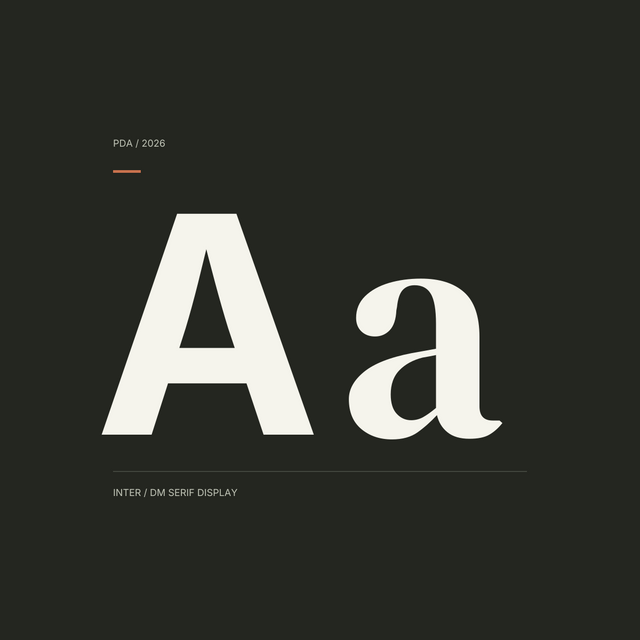
DM Serif Display
Regular
DM Serif Display Regular: Aa; R and g; zero and O; one, lowercase l and uppercase I; 0123456789
Opening pages
One large sentence or a short title is enough.
Google Fonts
30
Bodoni Moda
Regular
Bodoni Moda Regular: Aa; R and g; zero and O; one, lowercase l and uppercase I; 0123456789
Large cover titles
The fine strokes need size. Check a printed copy before using it small.
Google Fonts
31–40 / 50
Labels & numbers
For drawing references, schedules and short notes.
31
Roboto Condensed
Regular
Roboto Condensed Regular: Aa; R and g; zero and O; one, lowercase l and uppercase I; 0123456789
Narrow labels
Useful when the label has to fit beside a detail.
Google Fonts
32
Barlow Condensed
Regular
Barlow Condensed Regular: Aa; R and g; zero and O; one, lowercase l and uppercase I; 0123456789
Legends
Keep labels short. Long notes are easier in a wider font.
Google Fonts
33
Archivo Narrow
Regular
Archivo Narrow Regular: Aa; R and g; zero and O; one, lowercase l and uppercase I; 0123456789
Material schedules
A compact option for tables. Use columns to align the entries.
Google Fonts
34
Oswald
Regular
Oswald Regular: Aa; R and g; zero and O; one, lowercase l and uppercase I; 0123456789
Diagram titles
Use above the diagram; choose a wider font for the explanation.
Google Fonts
35
IBM Plex Sans Condensed
Regular
IBM Plex Sans Condensed Regular: Aa; R and g; zero and O; one, lowercase l and uppercase I; 0123456789
Notes beside drawings
The narrower member of the Plex family. Handy in a tight margin.
Google Fonts
36
Roboto Mono
Regular
Roboto Mono Regular: Aa; R and g; zero and O; one, lowercase l and uppercase I; 0123456789
Drawing codes
Every character has the same width. Useful for codes such as A-101.
Google Fonts
37
IBM Plex Mono
Regular
IBM Plex Mono Regular: Aa; R and g; zero and O; one, lowercase l and uppercase I; 0123456789
Numbered labels
Pair with IBM Plex Sans for the rest of the drawing sheet.
Google Fonts
38
Source Code Pro
Regular
Source Code Pro Regular: Aa; R and g; zero and O; one, lowercase l and uppercase I; 0123456789
Scripts and code
For Grasshopper notes, code examples and short technical extracts.
Google Fonts
39
Inconsolata
Regular
Inconsolata Regular: Aa; R and g; zero and O; one, lowercase l and uppercase I; 0123456789
Technical notes
A lighter-looking option for drawing references and short codes.
Google Fonts
40
Space Mono
Regular
Space Mono Regular: Aa; R and g; zero and O; one, lowercase l and uppercase I; 0123456789
Numbered diagrams
A conspicuous mono font. A few labels go a long way.
Google Fonts
41–50 / 50
Posters & sketchbooks
For a few words that need a different voice.
41
Bebas Neue
Regular
Bebas Neue Regular: Aa; R and g; zero and O; one, lowercase l and uppercase I; 0123456789
Poster titles
Tall capitals for a few large words. Keep the paragraph text elsewhere.
Google Fonts
42
Anton
Regular
Anton Regular: Aa; R and g; zero and O; one, lowercase l and uppercase I; 0123456789
Large posters
Very heavy letters. Leave generous margins around the title.
Google Fonts
43
League Spartan
Regular
League Spartan Regular: Aa; R and g; zero and O; one, lowercase l and uppercase I; 0123456789
Portfolio covers
Bold works well on a cover. Pair it with Work Sans inside.
Google Fonts
44
Syne
Regular
Syne Regular: Aa; R and g; zero and O; one, lowercase l and uppercase I; 0123456789
Experimental titles
Try the actual project name. The wider weights can change its shape a lot.
Google Fonts
45
Tenor Sans
Regular
Tenor Sans Regular: Aa; R and g; zero and O; one, lowercase l and uppercase I; 0123456789
Quiet cover pages
One regular style. Use size and spacing to build the hierarchy.
Google Fonts
46
Josefin Sans
Regular
Josefin Sans Regular: Aa; R and g; zero and O; one, lowercase l and uppercase I; 0123456789
Light cover titles
The small x-height gives it a delicate look. Keep captions in another font.
Google Fonts
47
Cormorant Garamond
Regular
Cormorant Garamond Regular: Aa; R and g; zero and O; one, lowercase l and uppercase I; 0123456789
Heritage projects
Fine details suit large titles. Avoid tiny captions.
Google Fonts
48
Architects Daughter
Regular
Architects Daughter Regular: Aa; R and g; zero and O; one, lowercase l and uppercase I; 0123456789
Sketch annotations
For a few informal notes. Keep dimensions in a plain font.
Google Fonts
49
Patrick Hand
Regular
Patrick Hand Regular: Aa; R and g; zero and O; one, lowercase l and uppercase I; 0123456789
Diagram notes
Easygoing handwriting for short comments and labels.
Google Fonts
50
Kalam
Regular
Kalam Regular: Aa; R and g; zero and O; one, lowercase l and uppercase I; 0123456789
Design notebooks
A sloping, pen-like hand. Best in small amounts.
Google Fonts
Before you export
Print one page at its final size. Read the smallest caption. Check I, l, 1, O and 0 in your drawing codes, then open the exported PDF and look for changed line breaks.
Before downloading
Can I use these fonts for paid work?
Yes. They are free for personal and commercial projects. If you share the font files, follow the license included with them.
How do I install them?
Download the font from Google Fonts and unzip the folder. Open the font file and choose Install. Restart your design app if the font does not appear.
Will they work in CAD software?
Check the font formats your software accepts. Google Fonts are not SHX fonts. Test a drawing and its PDF before changing the whole set.
What about other languages?
Check the font page for the letters and symbols you need. Noto has separate families for many writing systems.


0 Comments
There are no comments for this article. Be the first one to leave a message!